
Asset Overview
The Overview tab is the landing page for any asset (table, view, schema, etc.) in DQLabs Prizm. It consolidates key metrics, business context, ownership, and lineage into a single view, giving users a quick understanding of what the asset is, its health, and how it fits into the broader data ecosystem.Asset Overview Purpose
The Overview tab is designed to answer, at a glance:- What is this asset? (Description, semantic context)
- Is it trustworthy? (Verified status, freshness, completeness score)
- Who owns it and who should use it? (Owners, Audience, AI guidance)
- Where does it fit in the pipeline? (Lineage preview)
- Is it healthy? (Alerts, Issues, Criticality badge)
Asset Overview Header
The asset page header gives a quick view of all the critical values related to the asset.
| Element | Description |
|---|---|
| Asset Name | The technical name of the asset (e.g., SILVER_DIM_DATE). |
| Source Icon | Indicates the connected platform (e.g., Snowflake). |
| Quality Score | Provides the Data Quality score, if configured. |
| Status Badge | Workflow status of the asset (Pending, Ready for Reviewed, Verified, Deprecated). |
| Criticality Badge | Business-impact rating of the asset (e.g., Critical, High, Medium, Low), shown top-right. |
| Short Description | One-line summary of the asset’s purpose. |
| Controls | Provides the ability to execute various agents or get recommendation |
| Activity Counters | Quick counts for Alerts, Issues, Views, Queries, Likes/Dislikes, and Conversations. |
| Owner Avatar | Shows the assigned owner; “NA” indicates no owner has been assigned yet. |
| Semantic Tags | Shows all business classification metadata tags |
| Breadcrumb | Hierarchical path showing Database → Schema (e.g., PRIZM_RETAIL > SILVER_REF). |
Asset Details
Asset Description
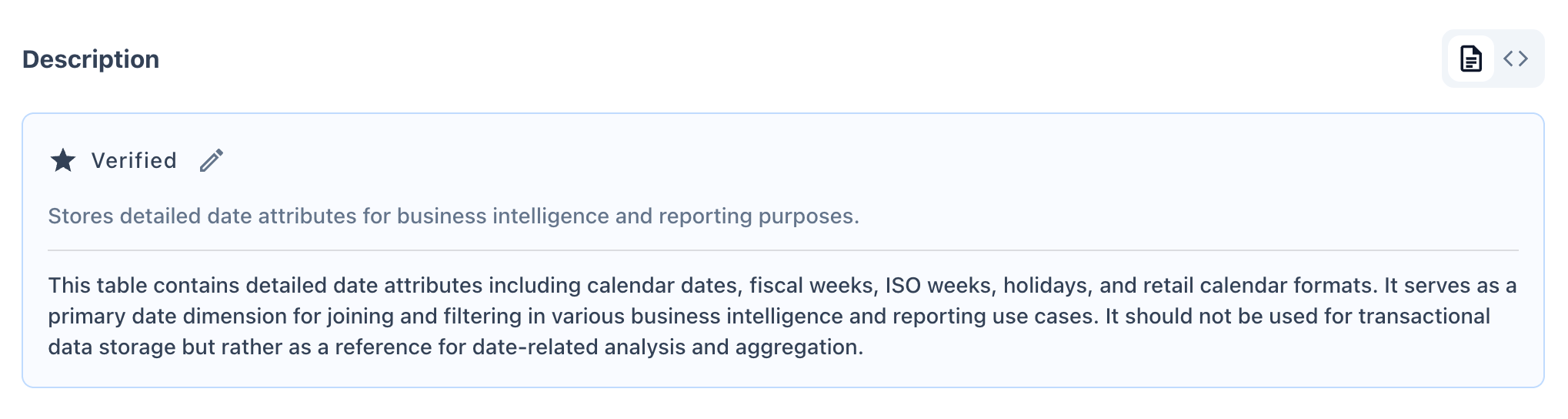
Displays the asset’s business and technical description.- Verified badge indicates the description has been reviewed and confirmed accurate by a steward/owner.
- Edit icon allows authorized users to update the description directly.
- Typically includes both a short summary and an extended explanation of intended use (and misuse) of the asset.
Semantic Context
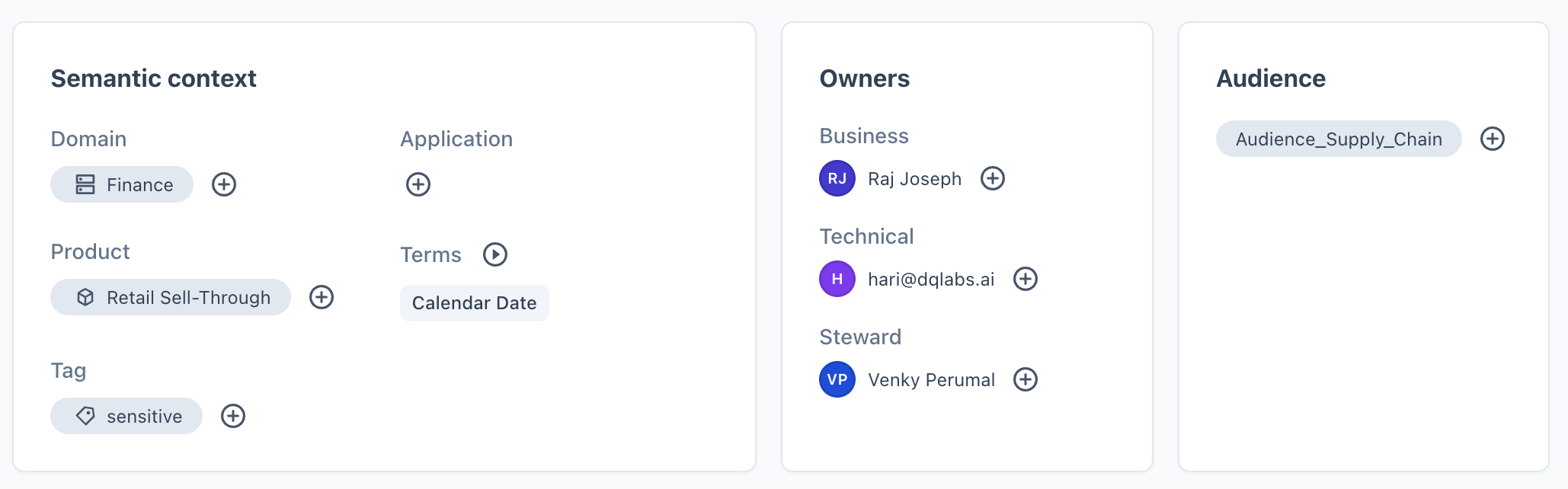
Captures business classification metadata to aid discovery and governance:| Field | Description |
|---|---|
| Domain | Business domain the asset belongs to (e.g., Retail, Finance). |
| Application | Source application or system associated with the asset. |
| Product | Product line the asset supports. |
| Terms | Linked glossary terms providing standardized business definitions (e.g., “Calendar Date”). |
| Tag | Free-form labels for categorization or sensitivity marking. |
Owners
Identifies accountable individuals/roles for the asset:- Business Owner — accountable for business relevance and usage.
- Technical Owner — accountable for technical implementation.
- Steward — responsible for data quality and governance upkeep.
Each role can be assigned via the ”+” icon if not already populated.
Audience
Lists the user groups or teams intended to consume this asset (e.g.,Audience_Supply_Chain). Helps with access governance and discovery relevance.
Who Should Use This
An AI-generated (Prizm AI) recommendation describing the ideal audience and appropriate use cases for the asset. If not yet generated, it will display a placeholder message and can be manually authored via the edit icon.
Lineage Preview
A condensed view of the asset’s data flow:- Upstream — traces the asset back to its origin source (e.g.,
REF_CALENDAR → BRONZE_REF_CALENDAR → SILVER_DIM_DATE). - Downstream — shows dependent assets consuming this data (e.g., dashboards, staging tables, views).
- The expand icon links to the full Lineage tab for an interactive, detailed graph.

Context & More Information
Together, Context and More Info answer two distinct questions:- Context → Is this asset well-documented and governed?
- More Info → What exactly is this asset, technically, and when did it last change?
Context
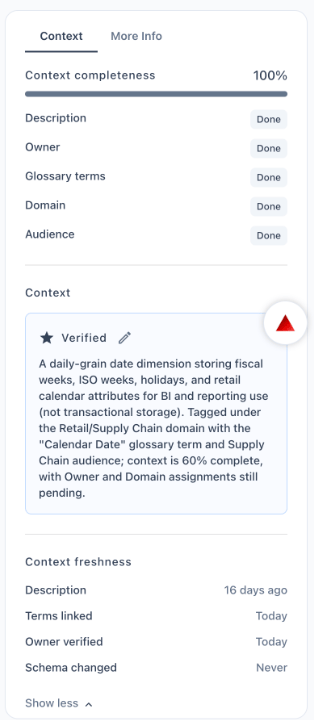
- Context Completeness % — a score reflecting how much governance metadata (description, owner, glossary terms, domain, audience) has been filled in.
- Field-level status — shows whether each governance field is Done or Pending.
- Prizm AI Suggested Context — AI-generated contextual insights; displays a placeholder if not yet generated.
- Context Freshness — shows how recently each governance field was last updated (e.g., description updated 16 days ago) and flags fields that have Never been reviewed (e.g., Owner verified, Schema changed).
More Information
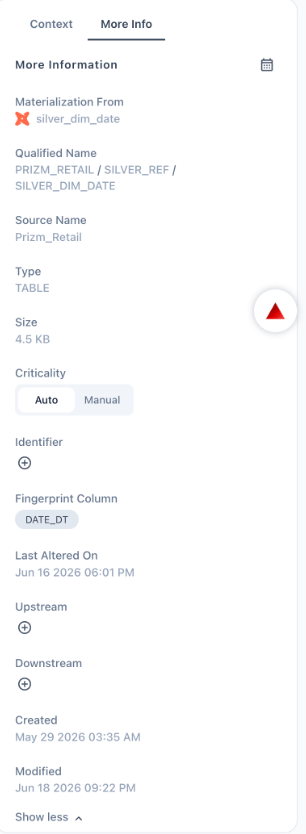
The More Info panel complements the Context panel by focusing on system and technical metadata rather than business/governance metadata.Field Reference
| Field | Description |
|---|---|
| Materialization From | Identifies the upstream tool/object the asset is materialized from, along with a platform icon (e.g., dbt model silver_dim_date). Useful for tracing how the asset is built. |
| Qualified Name | The full hierarchical path of the asset — Database / Schema / Asset Name (e.g., PRIZM_RETAIL / SILVER_REF / SILVER_DIM_DATE). Acts as the asset’s unique address within the platform. |
| Source Name | The connected data source the asset originates from (e.g., Prizm_Retail). |
| Type | The classification of the asset (e.g., TABLE, VIEW, SCHEMA). |
| Size | Current storage footprint of the asset (e.g., 4.5 KB). |
| Criticality | Indicates the business-impact level of the asset. Can be toggled between: • Auto — system-calculated based on usage, lineage, and downstream impact. • Manual — user-defined override for cases where business judgment differs from the system score. |
| Identifier | An optional custom identifier that can be added via the ”+” icon for cross-system reference or integration. |
| Fingerprint Column | The column used to uniquely identify/track row-level changes for the asset (e.g., DATE_DT). Used internally for change detection. |
| Last Altered On | Timestamp of the most recent change to the asset at the source system level (e.g., Jun 16 2026 06:01 PM). |
| Upstream | Manual entry point to add upstream dependencies not automatically captured by lineage detection. |
| Downstream | Manual entry point to add downstream dependencies not automatically captured by lineage detection. |
| Created | Date and time the asset was first cataloged in Prizm (e.g., May 29 2026 03:35 AM). |
| Modified | Date and time of the most recent metadata change within Prizm itself (e.g., Jun 18 2026 09:22 PM). |
\